As of a few days ago, I have moved all of my personal projects off of GitHub. This includes deleting old repos and forks, making repos I no longer work on public archives, and moving any active personal projects over to Codeberg. This has been a long time coming for me, ever since Microsoft bought GitHub - it didn’t seem right to host my open-source code on a platform owned by Big Tech1. The impetus to move was made stronger by the introduction of Copilot, and the subsequent realisation that my code was going to be ingested by a large language model used to make slop. (And Copilot is slop, even for LLM standards. Do any of your tech colleagues use Copilot over Claude or ChatGPT?)
hanyuone.live was the last project I moved, because it was by far the most complex. All of my other projects were one-off toys that could directly be migrated with Codeberg’s tool. My website had GitHub Actions, a CI/CD platform that automated building my code into static web files and deploying them to Cloudflare. GH Actions is specific to GitHub itself, whcih means that if I wanted to have automated deployment on Codeberg, I’d have to do some really fiddly translations of build scripts into whatever format works on Codeberg.
Before we even start on that, though, first we had to actually move the raw code itself.
Porting the repo
I had trouble even porting the project over to Codeberg. When I used the migration tool and started following the outline in codeberg.page, I ran out of storage. Checking the storage, it said I had used up all 1.2GB allocated to me? There was no way I wrote that much code, and I don’t think I uploaded any MP4s or high-res photos, so what was going on?
It turns out that I had accidentally pushed the /target folder (which contains all the packages and build artifacts for the projects, similar in purpose and bloat to /node_modules) to the repo at one point, and all of its contents were stored in the .git folder. The contents itself were about 600MB, and by setting up the pages branch, as outlined in codeberg.page, I copied .git over to that branch as well, which resulted in the combined 1.2 gigs. Doesn’t matter for Microsoft-backed GitHub though, which has a storage cap of 10 gigabytes per repo!
That means I had to do some cleanup (which you should do even if you have a ridiculous storage cap, by the way - code quality and all that). There is a tool called git-filter-repo that removes certain files and folders from your Git history, and hence from .git. It can be useful for removing secrets, and it even has an in-built analyser that detects what paths to remove:
git filter-repo --analyze
Once I found that /target was the culprit, I went to work removing all of those folders from Git history:
git filter-repo --path target --invert-paths
After running that command, .git went from 600MB to ~50MB, far more acceptable. Moving on to porting actions themselves!
Porting Actions
As soon as I started porting over my workflow YAML files, I realised how spoiled I was with GH Actions. I used to test my workflows by pushing a small change, waiting a few minutes, seeing if it failed and trying again. Each time that was happening, a VM with 16GB of RAM, 14GB of storage and 4 cores spun up instantly, dutifully ran my workflow and ingested gigabytes of Rust and Node caches.
Because Codeberg is a far smaller organisation than GitHub, and because it is a non-profit, it could offer fewer resources. Below is a table, directly copied from their Actions doc repo, that outlines the specs of the three runners Codeberg offers natively, all of which are smaller than GitHub’s default:
| Label | Arch | CPU | RAM | Runtime | Notes |
|---|---|---|---|---|---|
codeberg-tiny | amd64 | 1 | 2G | 2 min | Intended for very lightweight jobs like linters and other helpers |
codeberg-small | amd64 | 2 | 4G | 5 min | |
codeberg-medium | amd64 | 4 | 8G | 10 min |
None of these runners have enough resources for any of my Actions scripts. Each deployment took 10 minutes on the larger GitHub default runner, and the largest runner on Codeberg has worse specs and a hard 10 minute runtime. There was a real chance that I couldn’t use Codeberg’s native runners at all, for a static website deployment.
Codeberg also offers integration with self-hosted runners using Woodpecker CI or Forgejo, the latter of which is designed to be mostly compatible with GH Actions syntax. I tried to host an instance of either Woodpecker or Forgejo onto my Raspberry Pi Zero, but they both only really supported Docker images (because a runner, by its very nature, involves running arbitrary code and potentially spinning up further Docker images, so having a “raw” runner could be a huge security risk). Raspberry Pi Zero runs on ARM v6, which Docker no longer supports.
So setting up a local runner turned out to be a dead end, which meant that I had to optimise my build process somehow. The approach I went for was to cut down on the amount of time spent downloading and compiling core frameworks, and I did this by front-loading that installation into a Docker image:
FROM ghcr.io/catthehacker/ubuntu:act-latest

# Install `pnpm`
RUN npm install -g pnpm

# Install Rust
RUN apt update
RUN apt install -y curl
RUN curl --proto '=https' --tlsv1.2 -sSf https://sh.rustup.rs | sh -s -- -y
ENV PATH="/root/.cargo/bin:${PATH}"

# Install wasm32 toolchain
RUN rustup target add wasm32-unknown-unknown

# Install `cargo-leptos`
RUN cargo install --locked cargo-leptos
I also wanted to cut down on download times for other crates my website needed, so I set up a cargo cache using Forgejo. I couldn’t use the GH Action I previously used, because it was coupled fairly tightly with the GitHub platform itself, so I had to write it myself:
      # Cargo caching
      - name: Setup `cargo` cache
        uses: https://code.forgejo.org/actions/cache@v5
        with:
          path: |
            ${{ env.CARGO_HOME }}/registry/index
            ${{ env.CARGO_HOME }}/registry/cache
            ${{ env.CARGO_HOME }}/git/db
            **/target
          key: ${{ runner.os }}-cargo-${{ hashFiles('**/Cargo.lock') }}
          restore-keys: ${{ runner.os }}-cargo-
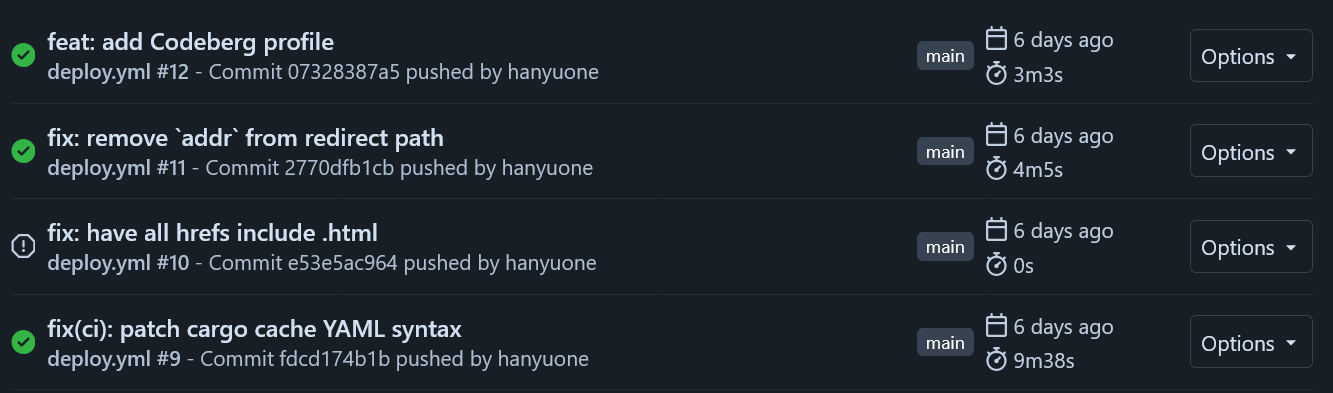
With all these improvements, I managed to get builds and deployments to fit within codeberg-medium, and I even got runtimes down to 3 minutes!
Licensing
While porting the website over, I realised I never licensed my code or my blogs. I didn’t want an AI crawler to gobble up my code, spit it out verbatim to a vibe-coded app and have it locked under proprietary lock and key. I want my code to be available for anyone to use and modify, and for any of those modifications to be similarly open-source!
So now I have, in the form of three licenses:
- The bulk of the code (the
/websitecrate) is under GNU’s GPL v3. - The
/macrosand/markdowncrates are under the “3-clause” BSD license, since the original code for those crates was under BSD. - The blogs themselves are under Creative Commons’ CC BY-SA 4.0.
Final words
After this successful port, I have deleted the hanyuone.live repository on GitHub. You can now find my blog’s source code at https://codeberg.org/hanyuone/hanyuone.live.
It also turns out that I can’t escape GitHub completely, so all of my professional work will still be on GitHub. However, all of my personal projects are now on Codeberg.
1: I say this as I’m writing on a Windows machine using Visual Studio Code. I’m using WSL though, and I’m learning Helix, I promise! ↩️